MATCH
With the help of match function we find out position of a lookup value in a row or column. MATCH supports approximate and exact matching, and wildcards (* ?) for partial matches. We often use match with Index, Vlookup for getting data. It can be used with text and numbers.
Syntax
=MATCH (lookup_value, lookup_array, [match_type])
lookup_value is the value you tell the match function to lookup
lookup_array is the list that you look an item up in
[match_type] tells the MATCH what sort of lookup to do:
The TypeOfMatch either 0, 1 or -1.
Using 0 will look for an exact match. If no match is found the #NA error will be shown.
Using 1 will look for an exact match, or the next lowest number if no exact match exists.
If there is no match or next lowest number the error #NA is shown.
The list of values being examined must be sorted for this to work correctly.
Using -1 will look for an exact match, or the next highest number if no exact match exists.
If there is no exact match or next highest number the error #NA is shown.
The list must be sorted for this to work properly.
Example:-1

In above image, here is some data in range B3 TO B10. With the use of match function, we can find out at what position D is coming in this range, for that we have to type formula =match(“D”,B3:B10,0), it will return 4, means D value locates at 4th position in range B3:B10. If we find “Q” positon in this range, then it will return #N/A, we “Q” not located in that list.
Example:-2
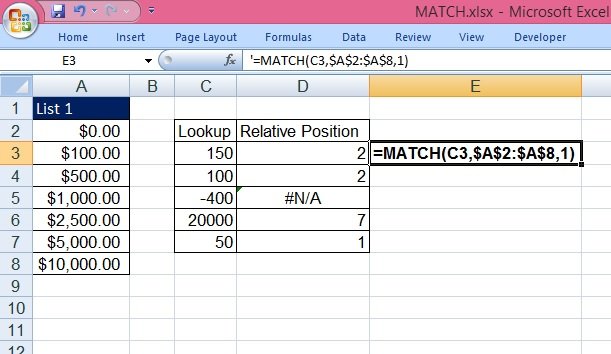
Using the 1 option suitable for a ascending list to find an exact or next lowest match.
The Ascending list gives the exact match.
The Descending list gives the #NA error.
The Wrong Value list finds the next lowest number.
The Descending list gives the #NA error.
The Wrong Value list finds the next lowest number.
Example:-3
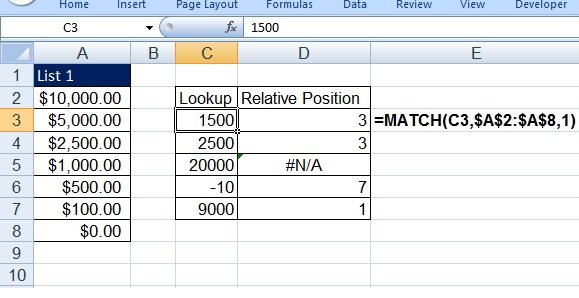
Using the -1 option suitable for a descending list to find an exact or next highest match.
The Ascending list gives the #NA error.
The Descending list gives the exact match.
The Wrong Value list finds the next highest number.
The Ascending list gives the #NA error.
The Descending list gives the exact match.
The Wrong Value list finds the next highest number.
Example:-4
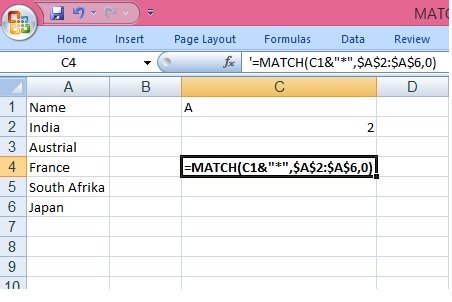
In above example, What we type in C1 cell, the match returns the position of the county name start from that letter in range A2:A6, this is example of wildcard in match function.